Glossary
What is a bill of materials (BOM)?
The structured list of everything needed to build one unit of a product, with the quantity of each part and how the parts fit into one another.
What a BOM line contains.
At least a part number, a description, a quantity and a unit of measure, and its place in the structure.
- Level Where the line sits in the structure. Level 0 is the finished product.
- Item number The line’s position, often matching a balloon on the drawing.
- Part number The unique identifier of the part.
- Description The part’s name and main attributes.
- Quantity and unit of measure How many per parent, in pieces, metres or kilograms.
- Revision The version of the part to use.
- Make or buy Whether the part is made in house or bought.
- Often also The material, the supplier, reference designators for electronics, and notes.
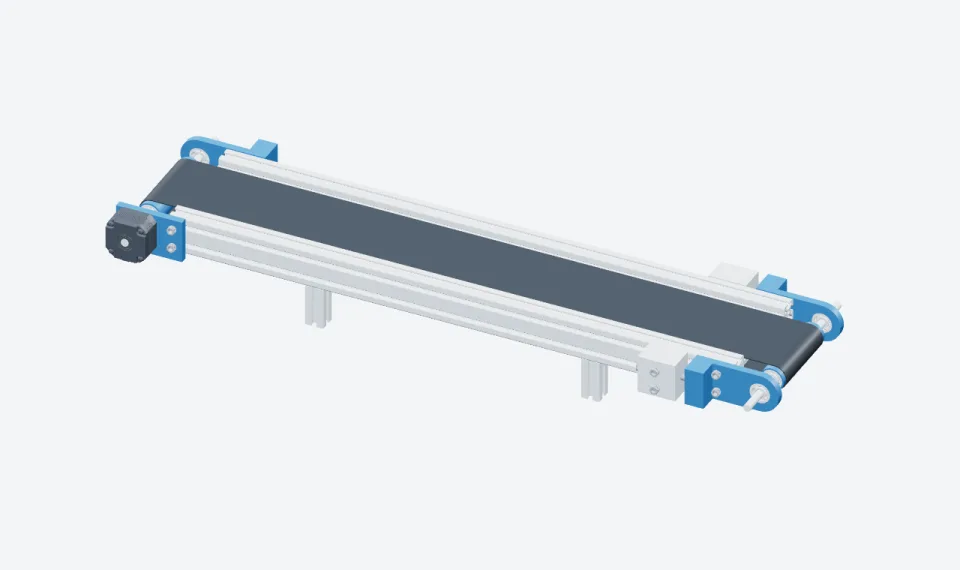
A real example. An open-source belt conveyor.
Its CAD export places 15 different parts 45 times. Listed one line per part number, that is a single-level BOM.
More detail
The ConveyorBeltCAD belt conveyor, published by Erin Ng under the MIT licence, is a small conveyor modelled in SOLIDWORKS and shared as STEP files.
| Item | Part number | Description | Qty |
|---|---|---|---|
| 1 | 5537T044 | Frame rail, single profile | 4 |
| 2 | 5537T031 | Frame rail, double profile | 2 |
| 3 | FrameBracket | Frame bracket | 3 |
| 4 | Anchorblock | Anchor block | 2 |
| 5 | BearingBracket | Bearing bracket | 2 |
| 6 | Shaft | Roller shaft | 2 |
| 7 | 5972K91 | Steel ball bearing | 8 |
| 8 | Belt | Conveyor belt | 1 |
| 9 | beltholder | Belt holder | 1 |
| 10 | 6627T64 | Stepper motor | 1 |
| 11 | StepperBracket | Stepper motor bracket | 1 |
| 12 | 91290A117 | Screw, M3 × 12 mm | 4 |
| 13 | 91290A230 | Screw, M5 × 14 mm | 8 |
| 14 | 91290A195 | Screw, M5 × 35 mm | 4 |
| 15 | 91290A205 | Screw, M6 × 50 mm | 2 |
| 15 part numbers | 45 |
Single-level. Multi-level.
A multi-level, or indented, BOM shows the whole tree. Quantities multiply down the tree, so a sub-assembly used twice doubles every part inside it.
More detail
A single-level BOM lists the direct components of one parent, as above. A multi-level BOM, also called an indented BOM, shows the whole product structure: the product, its sub-assemblies, their components, and so on down to raw materials.
Multi-level BOM, as a tree
- 0Belt conveyor× 1
- 1Frame× 1
- 2Frame rail, single profile× 4
- 2Frame rail, double profile× 2
- 2Frame bracket× 3
- 2Anchor block× 2
- 1Drive unit× 1
- 2Stepper motor× 1
- 2Stepper motor bracket× 1
- 2Screw, M3 × 12 mm× 4
- 1Roller× 2
- 2Roller shaft× 1
- 2Steel ball bearing× 4
- 2Bearing bracket× 1
- 1Conveyor belt× 1
- 1Belt holder× 1
- 1Screw, M5 × 14 mm× 8
- 1Screw, M5 × 35 mm× 4
- 1Screw, M6 × 50 mm× 2
- 1Frame× 1
EBOM, MBOM, SBOM. One product, three BOMs.
One product often has several BOMs, each organised for the people who use it.
| BOM | Owned by | Organised by | Used for |
|---|---|---|---|
| Engineering BOM (EBOM) | Engineering, in CAD and PLM | The product as designed, by function | Design release and engineering change control |
| Manufacturing BOM (MBOM) | Manufacturing engineering, in ERP | The product as built: assembly steps and workstations, plus consumables and packaging | Production planning, purchasing and assembly |
| Service BOM (SBOM) | Service and spare parts teams | The product as maintained: replaceable parts and kits | Spare parts catalogs and maintenance |
The service BOM is where an illustrated parts catalog starts: it keeps only the parts a technician can replace or order, and adds an exploded view for each figure.
When the BOM changes, the documents must follow.
A BOM line changes through an engineering change order. The documents that show the part are the ones most often missed.
More detail
The change can be a new part number, a new revision or a new quantity, from a given serial number or date. The documents that show the part have to follow, and they are the ones most often missed: work instructions, maintenance manuals and parts catalogs.
Questions
What is a bill of materials (BOM)?
A bill of materials (BOM) is the structured list of everything needed to build one unit of a product: raw materials, parts and sub-assemblies, with the quantity of each and how they fit into one another. Each line gives at least a part number, a description, a quantity and a unit of measure. Engineering, purchasing, production and service all work from it, usually in a PLM or ERP system.
What is the difference between a single-level and a multi-level BOM?
A single-level BOM lists only the direct components of one product or assembly. A multi-level, or indented, BOM shows the whole tree: each sub-assembly with its own components, down to raw materials, with quantities multiplied at each level.
What is the difference between an EBOM and an MBOM?
The engineering BOM (EBOM) describes the product as designed, from CAD and PLM. The manufacturing BOM (MBOM) describes how it is built: grouped by assembly steps and workstations, with the consumables and packaging that designers do not model.
Is a BOM the same as a parts list?
Nearly. The parts list on a drawing is usually a single-level BOM for that drawing. A full BOM covers the whole product structure and carries more data, such as revisions, units of measure and make or buy.
What should a BOM include?
At least a part number, a description, a quantity and a unit of measure on each line, and its level or parent. Most BOMs also carry an item number, the revision, make or buy, and the supplier.
Start your bill of materials
Use the free bill of materials template to list your parts, quantities and revisions in a clear structure.
Updated