Free template · Excel and CSV
Bill of materials template, single-level and multi-level.
One sheet per BOM type, the extended quantity calculated for you, and a filled-in robot arm example.
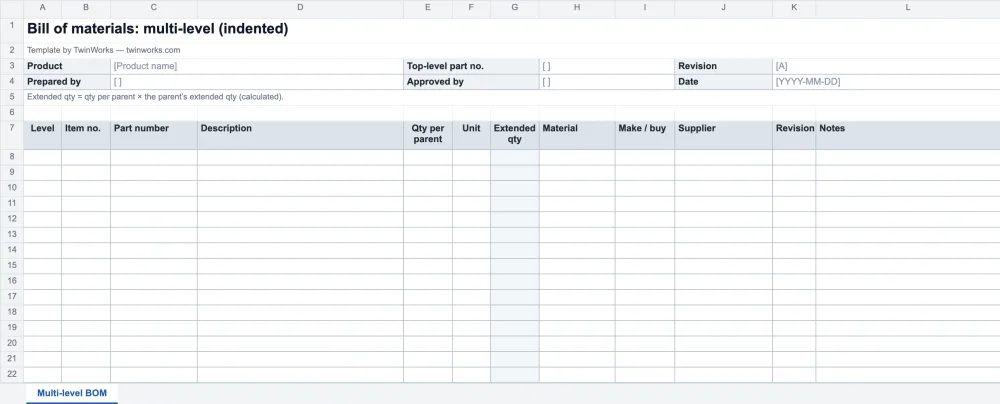
Single-level or multi-level?
A single-level BOM lists the direct components of one assembly. A multi-level BOM shows the whole structure, with a level number on each line.
Twelve columns. Each one earns its place.
The extended quantity is calculated from the levels; unit and make or buy are drop-down lists.
| Column | What goes in it | Example |
|---|---|---|
| Level | 0 for the finished product, 1 for its direct components, 2 below that | 2 |
| Item no. | The balloon number on the drawing or exploded view | 1.2.3 |
| Part number | Your unique identifier: one part number per form, fit and function | ISO7045-M3X6 |
| Description | The noun first, then the details | Pan-head screw M3 × 6 mm |
| Qty per parent | How many go into one parent assembly | 8 |
| Unit | pcs, m, kg, L or set, from a drop-down list | pcs |
| Extended qty | Calculated: qty per parent × the parent’s extended qty | 8 |
| Material | Material or finish | Steel |
| Make / buy | Made in-house or bought, from a drop-down list | Buy |
| Supplier | Supplier or manufacturer | Feetech |
| Revision | The revision of the part, not of the BOM | A |
| Notes | Anything the buyer or the assembler needs | Jaw to servo horns |
A real arm, line by line.
The example lists the servos of the open-source SO-101 robot arm and every part of its gripper named in the public replacement procedure. Part numbers are examples; the full parts list of the arm is in the SO-ARM100 design files.
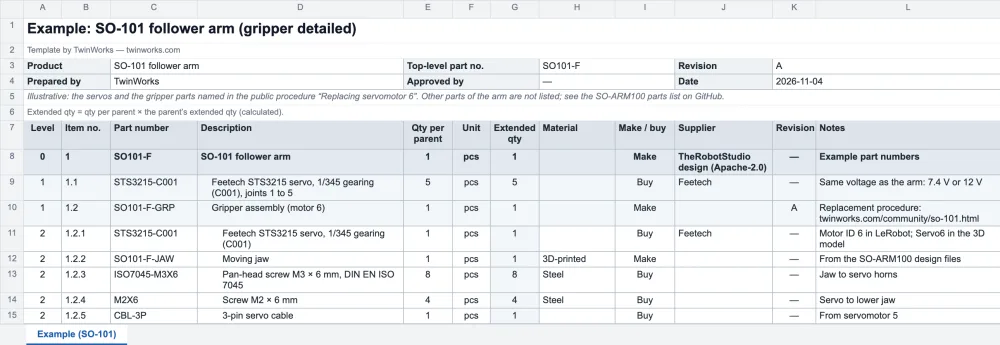
See the example as a table
| Level | Item no. | Part number | Description | Qty per parent | Extended qty | Make / buy |
|---|---|---|---|---|---|---|
| 0 | 1 | SO101-F | SO-101 follower arm | 1 | 1 | Make |
| 1 | 1.1 | STS3215-C001 | Feetech STS3215 servo, 1/345 gearing (C001), joints 1 to 5 | 5 | 5 | Buy |
| 1 | 1.2 | SO101-F-GRP | Gripper assembly (motor 6) | 1 | 1 | Make |
| 2 | 1.2.1 | STS3215-C001 | Feetech STS3215 servo, 1/345 gearing (C001) | 1 | 1 | Buy |
| 2 | 1.2.2 | SO101-F-JAW | Moving jaw, 3D-printed | 1 | 1 | Make |
| 2 | 1.2.3 | ISO7045-M3X6 | Pan-head screw M3 × 6 mm, DIN EN ISO 7045 | 8 | 8 | Buy |
| 2 | 1.2.4 | M2X6 | Screw M2 × 6 mm | 4 | 4 | Buy |
| 2 | 1.2.5 | CBL-3P | 3-pin servo cable | 1 | 1 | Buy |
Five BOM habits that save rework.
- One part number, one part. Never reuse a part number for something with a different form, fit or function.
- Match the drawings. Keep item numbers identical to the balloons on the drawings, the exploded views and the parts catalogue.
- Write descriptions noun first. “Screw, pan-head, M3 × 6 mm” sorts and searches better than “M3 × 6 pan-head screw”.
- Revise it like a drawing. Raise the BOM revision for every change and record it in your change process (ECO or ECN).
- Keep one source. Export to CSV for the ERP rather than retyping, so the purchasing BOM and the engineering BOM do not drift apart.
TwinWorks Animate
From the 3D model to the parts list.
Before you fill in the BOM, explode the assembly and look at every part. Animate does it free in your browser from a STEP or STP file, with no account.
Need an illustrated parts catalogue? Our technical writing services make them, built in TwinWorks and handed over editable.

Questions
What is in this bill of materials template?
This free bill of materials template is an Excel workbook (.xlsx) with four sheets: a single-level BOM, a multi-level (indented) BOM, a filled-in example for the SO-101 robot arm, and a how-to sheet. The columns are level, item number, part number, description, quantity per parent, unit, extended quantity, material, make or buy, supplier, revision and notes. The extended quantity is calculated from the levels, unit and make or buy are drop-down lists, and a CSV with the same columns is included for ERP or PLM import. It is free, with no account and no email.
What is a bill of materials template?
A bill of materials template is a ready-made spreadsheet for listing every part, sub-assembly and raw material needed to build a product, with part numbers, descriptions, quantities and units, and often the material, supplier, make or buy and revision.
What is the difference between a single-level and a multi-level BOM?
A single-level BOM lists the direct components of one assembly. A multi-level (indented) BOM lists every sub-assembly and its components down to the purchased parts, with a level number on each line, so you can see the whole product structure.
How is the extended quantity calculated in a multi-level BOM?
Multiply the quantity per parent by the extended quantity of the parent line. In this template a formula finds the nearest line above with a level one lower and does it for you: 8 screws per gripper, on 1 gripper per arm, gives 8 screws per arm.
Can I import this BOM into an ERP or PLM system?
Yes. Use the CSV included in the download, or save a sheet as CSV UTF-8 from Excel, then map the columns in your system’s import tool. Keep part numbers unique and the level column numeric.
Is the bill of materials template free?
Yes. The Excel workbook and the CSV are free to download, use and adapt in your company, with no account or email address.
When the BOM changes, what else does?
A new part number touches the manuals, the work instructions and the parts catalogue. TwinWorks identifies affected content through established relationships when a relevant product change occurs, and your experts review the result.
Updated