

Standard Operating Procedures (SOPs) define the safest, fastest, and most consistent way to complete a task. The best SOPs are short, clear, and designed for the people who do the work every day. Use this guide to build SOPs that reduce errors, speed training, and hold up during audits.
Why SOPs matter in manufacturing
- Consistency: Every shift follows the same standard, reducing variation.
- Quality: Built-in checkpoints prevent defects before they ship.
- Safety: Hazards and PPE requirements are captured upfront.
- Scalability: New hires ramp faster with repeatable guidance.
Before you start: pick a high-impact process
Start with a process that drives the most errors, downtime, or scrap. Define the scope, owner, and goal so the SOP solves a real problem, not just a documentation checkbox.
- Scope: What task does the SOP cover? What does it exclude?
- Owner: Who approves changes and keeps it current?
- Goal: Reduce errors, improve uptime, or standardize training?
How to create SOPs in 7 steps
- Map the process. Document the current flow and identify variations across shifts or sites.
- Choose the right format. Use checklists for repeatable tasks, flowcharts for decisions, and work instructions for detailed steps.
- Write clear, action-based steps. Use simple verbs, avoid jargon, and keep each step to one action.
- Add quality and safety checkpoints. Include measurements, tolerances, and PPE requirements.
- Validate with operators. Test the SOP on the floor and update anything that slows work or causes confusion.
- Train and publish. Roll out with training and ensure the SOP is easy to access at the point of use.
- Measure and improve. Track outcomes and revise after engineering or process changes.
SOP template outline
- Title and purpose: What the SOP is for and why it exists.
- Scope: Which products, lines, or situations it applies to.
- Roles and responsibilities: Who does what.
- Required tools and materials: Include model numbers when needed.
- Procedure steps: Use numbered steps with clear actions.
- Safety and quality checks: Include tolerances and pass/fail criteria.
- Records and evidence: What needs to be captured for audits.
- Revision history: Track changes and approvals.
Get the free starter kit for a ready documentation structure and worksheets, including a reusable task sheet, a review checklist and a revision log.
Example: SOP steps for replacing a pump coupling guard
A short, generic example of the procedure section. Your own SOP adds your site’s lockout rules, the part numbers, and the values from the equipment manual.
- Isolate the pump. Stop the pump, then lock out and tag out its power supply following your site’s lockout procedure. Confirm it cannot start.
- Remove the old guard. Remove the guard fasteners and lift the guard clear of the coupling.
- Inspect the coupling. Check for wear, damage, or misalignment. Report anything outside the limits in the equipment manual before you continue.
- Fit the new guard. Check the part number against the parts list, then position the guard so it fully covers the coupling.
- Tighten the fasteners. Tighten to the value given in the equipment manual.
- Check the clearance. Where the manual allows it, turn the shaft by hand to confirm the coupling does not touch the guard.
- Restore and record. Remove the lockout, run the pump briefly and check for unusual noise or vibration, then record the replacement and any findings.
SOPs vs work instructions
SOPs define the standard process; work instructions are the detailed, step-by-step guidance used on the floor. Many teams use SOPs for the “what and why” and work instructions for the “how.” If the SOP is longer than one page, break the detailed actions into work instructions.
Turn a PDF SOP into a reviewed digital work instruction
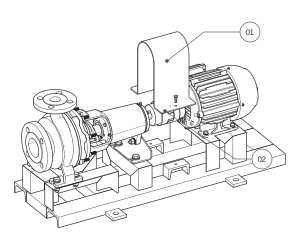
Start with a task whose method your team can verify. The worked example below uses our illustrative CP-200 maintenance PDF, revision 02. Its draft wording and review notes are authored examples, not a recorded AI run or customer sign-off.
1. Identify the source and its gaps
The sample describes guard removal, coupling inspection and guard refitting. It also requires isolation and a verified safe condition before access. Record the source revision and task scope, and ask the expert for requirements that the excerpt does not supply.
2. Prepare an editable instruction
TwinWorks can draft procedure text from reference PDFs. An author can also write the steps directly. In either case, retain the source context, separate the task into understandable actions and keep missing requirements visible for review.
| Source information | Example draft result | Reviewer correction or check |
|---|---|---|
| Before access: isolation and a verified safe condition. | “Remove the guard” shown without its prerequisite. | Retain the approved before-you-begin reference and equipment-specific prerequisites in the instruction context. |
| Guard removal, coupling inspection and refitting. | Three editable task steps. | Confirm the sequence, relevant parts, access and views against the actual method. |
| The excerpt gives no task-specific tightening value. | An unresolved fastener requirement. | Obtain the approved specification; do not invent a value to complete the draft. |
3. Add the guidance the task needs
Add relevant text, images and media. A supported 3D model can provide part-level views and authored actions; it is optional. Check CAD formats and visual-authoring responsibilities before relying on model-based guidance.
4. Review the whole instruction before release
- Check each technical fact and the intended task sequence against the approved sources.
- Resolve missing warnings, tools, values and acceptance criteria with the expert.
- Check that visuals refer to the intended equipment and parts.
- Confirm that operators can access the reviewed instruction in the intended setup.
5. Inspect the operator view and configured records
The published SO-101 viewer example shows part highlights, step text and navigation on a different task. It illustrates the operator experience; it is not the output of this CP-200 worked example.
For reporting, inspect the illustrative pump execution record. Its sample checklist includes a comment asking for a closer guard-mounting view, with reviewer sign-off still pending. Choose status, comments, photos and other fields to fit your workflow; reported execution is separate from expert or quality approval.
Explore digital work instructions software for industrial teams to compare authoring, operator access and reporting on one of your own tasks.
Keep SOPs current with a review cadence
SOPs fail when they drift from reality. Set a review cycle (quarterly or semiannual) and update immediately after process, tooling, or quality changes. Keep revisions lightweight so updates do not stall operations.
Digitize SOPs for faster updates
Static PDFs can be difficult to maintain and distribute. Digital work instructions make detailed steps easier to follow at the point of work and quicker to update. TwinWorks can draft text from reference PDFs; authors create or review the 3D actions, and operators can record configured comments and photos as they work. See how TwinWorks builds visual work instructions.
FAQ
What is an SOP?
An SOP (standard operating procedure) is a documented, repeatable way to complete a task consistently and safely.
What is the difference between SOPs and work instructions?
SOPs define the standard process, while work instructions provide step-by-step guidance for executing that process on the floor.
How long should an SOP be?
Keep SOPs as short as possible while covering safety, quality checks, and critical steps. Use work instructions for detailed step-by-step execution.
Who should own SOPs?
A process owner should be accountable for each SOP, with input from operators, quality, and safety stakeholders.
How often should SOPs be reviewed?
Review SOPs on a fixed cadence (quarterly or semiannually) and immediately after process, tooling, or quality changes.
Explore digital work instructions software for authoring, reviewing and delivering SOPs to industrial teams.