Compared · November 2026
Free BOM and parts catalog tools for STEP files.
Five free tools, what each gives you from a STEP file, and where it stops. We make one of them, so we say where another fits better.
Pick by job. Not by name.
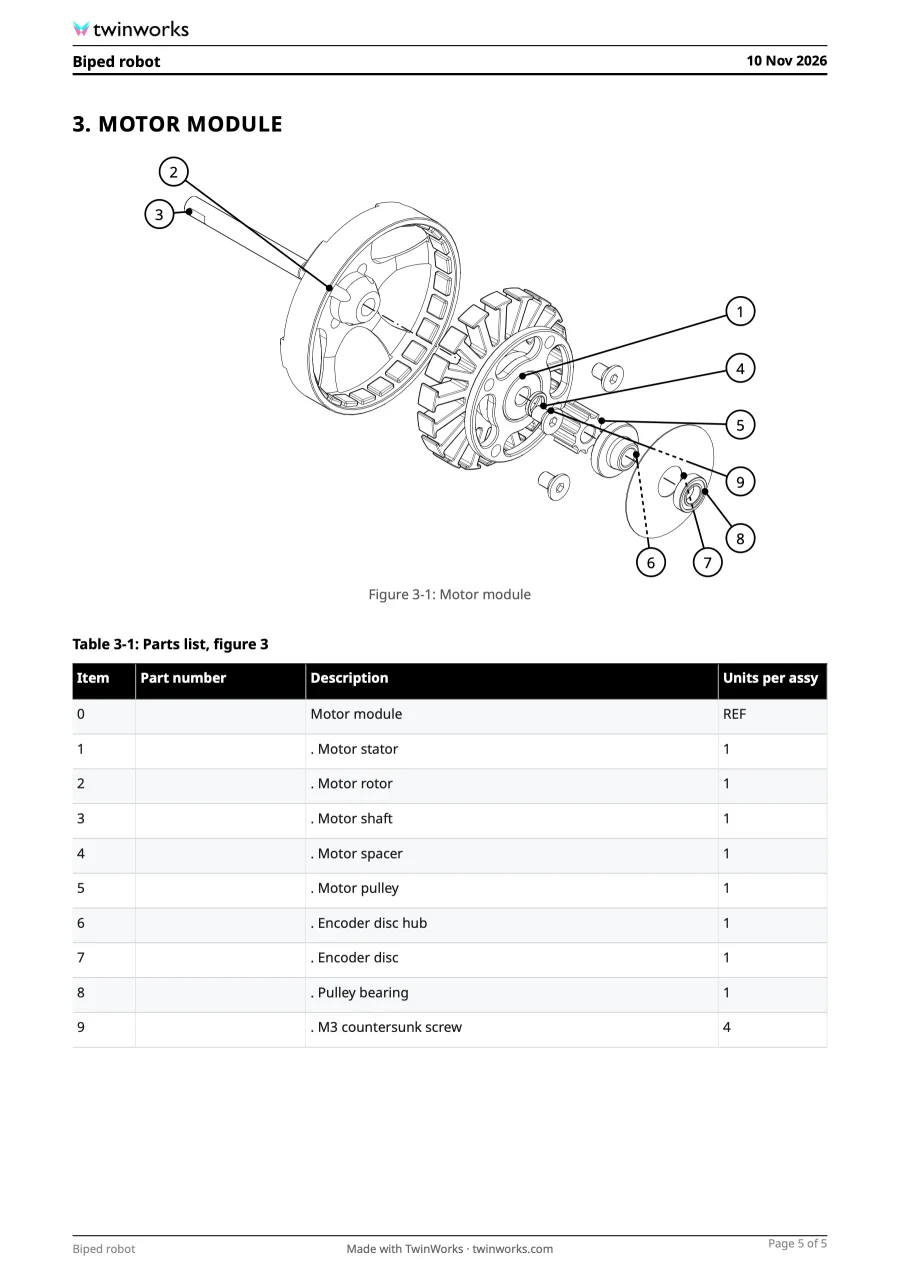
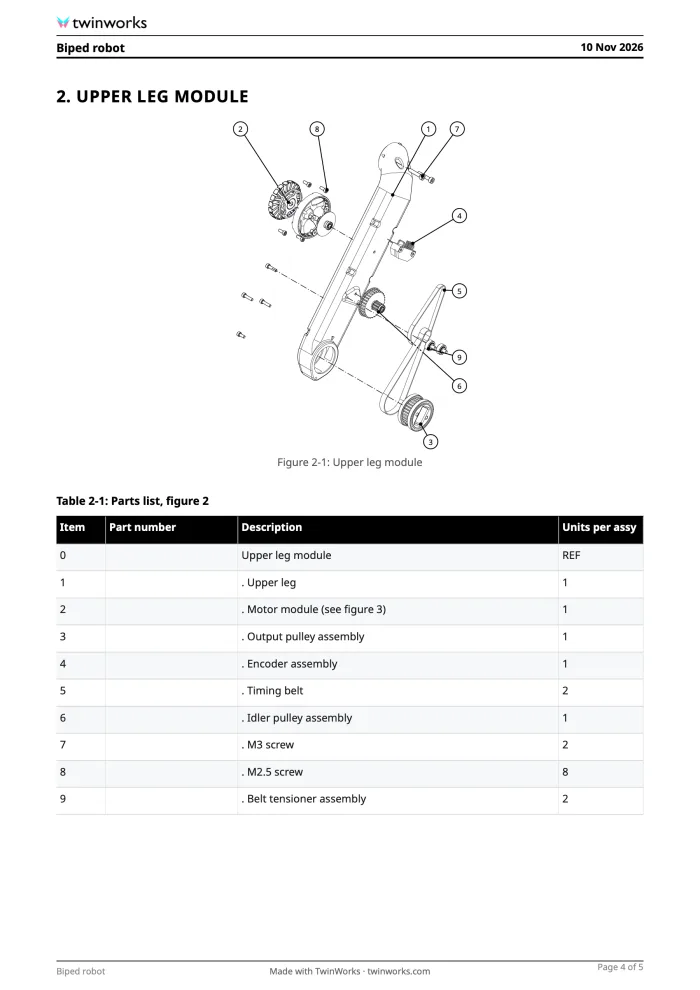
- A BOM and a numbered parts catalogTwinWorks STEP to parts listPDF, Excel and CSV, then up to 20 numbered figures.
- A BOM without uploading the fileBOMproofExcel or CSV, read in your browser.
- Exploded line drawings for a manualLineplateSVG, DXF, PDF and PNG. Balloons on its paid plan.
- Look inside a large modelMeshMarkupSection, measure and explode. Files up to 1 GB.
- A step-by-step assembly manualAssemblyStepAI-planned steps as a PDF and a video.
- Watch the assembly come apart and moveTwinWorks AnimateExploded view, joint animation and an MP4.
Side by side. From each tool’s own pages.
Read on 15 November 2026. Tools change, so check each site.
| Tool | BOM export | Exploded figures | Numbered parts and list | Account | File is read | Free limits |
|---|---|---|---|---|---|---|
| TwinWorks STEP to parts list | PDF, Excel, CSV | Up to 20, in one PDF | ✓ | None | On our servers, deleted when you leave | 100 MB, 20 figures |
| BOMproof | Excel, CSV | — | — | None | In your browser | 150 MB |
| Lineplate | CSV parts list on its paid plan | Line art: SVG, DXF, PDF, PNG | On its paid plan | None | In your browser | 250 parts, 1 project |
| MeshMarkup | On screen only | In the viewer | — | None to view | In your browser; very large files on its server | 1 GB |
| AssemblyStep | On screen only | In a PDF manual | Parts list with pictures | Sign-in for the manual | In your browser; a text summary goes to its AI | 1 AI plan a day, watermark |
✓ stated on the tool’s own pages. — not stated there. Each name links to the page we read.
How to choose. Three questions.
- What do you need out? A spreadsheet, numbered figures or line drawings? Each tool stops at a different point.
- Can the file leave your computer? If not, pick a tool that reads it in the browser.
- How big is the assembly? Check the free limit on size, parts or figures before you start.
Where STEP to parts list fits
Best when you need the figures and the list together.
One STEP file in: a bill of materials, then exploded figures with every part numbered. Pick another tool to keep the file in your browser, or for line drawings.
Questions
Is there a free tool that makes a BOM from a STEP file?
Yes. TwinWorks STEP to parts list and BOMproof both do it free, with no account. TwinWorks gives the list as a PDF, Excel and CSV, and BOMproof as Excel or CSV. BOMproof reads the file in your browser. TwinWorks uploads it and deletes it when you leave the page.
Which free tool makes an illustrated parts catalog from a STEP file?
TwinWorks STEP to parts list draws up to 20 exploded figures with every part numbered, each with its parts list, in one PDF, free and with no account. Lineplate draws exploded line art free, but its numbered balloons and parts lists are on its paid plan. AssemblyStep makes an assembly manual with a parts list, with a watermark on the free PDF.
Which tools keep my file in the browser?
BOMproof, Lineplate and AssemblyStep say the file is read in your browser and not uploaded. MeshMarkup reads most files in the browser and converts very large ones on its server. TwinWorks uploads the file so its servers can read it, and deletes it when you leave the page.
What does a BOM from a STEP file leave out?
A STEP file holds names, part numbers and quantities, but not material, supplier or revision. Every tool here gives a first draft that you complete.
How did you compare them?
We read each tool’s own public pages on 15 November 2026. We make TwinWorks. Features and prices change, so check each site.
Try it on one of your assemblies.
Drop in a STEP file and get the list, then the catalog. No account needed.
TwinWorks publishes this page and is not affiliated with the other companies named. Their names belong to their owners.
Updated